


 客服
客服




AQ7933 OTDR Emulation Software属于光时域反射计类别。AQ7933 is PC software for displaying, analyzing, and reportingOTDR waveform data measured by Yokogawa OTDRs. It helpsusers efficiently review large volumes of t
ONETEST 欢迎您
厂商登录 | 入驻
登录 | 注册 购物车 微信公众号厂商登录
类似产品
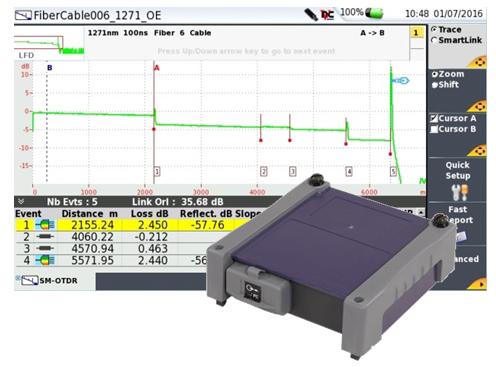
利用VIAVICWDMOTDR解决方案,有线电视运营商、暗纤提供商和电信服务提供商能够通过复用/解复用进行测试,并对活动C-RAN、DAS和移动前传CWDM网络执行完整的端到端链路特征分析或故障排查。详细了解OTDR测试。
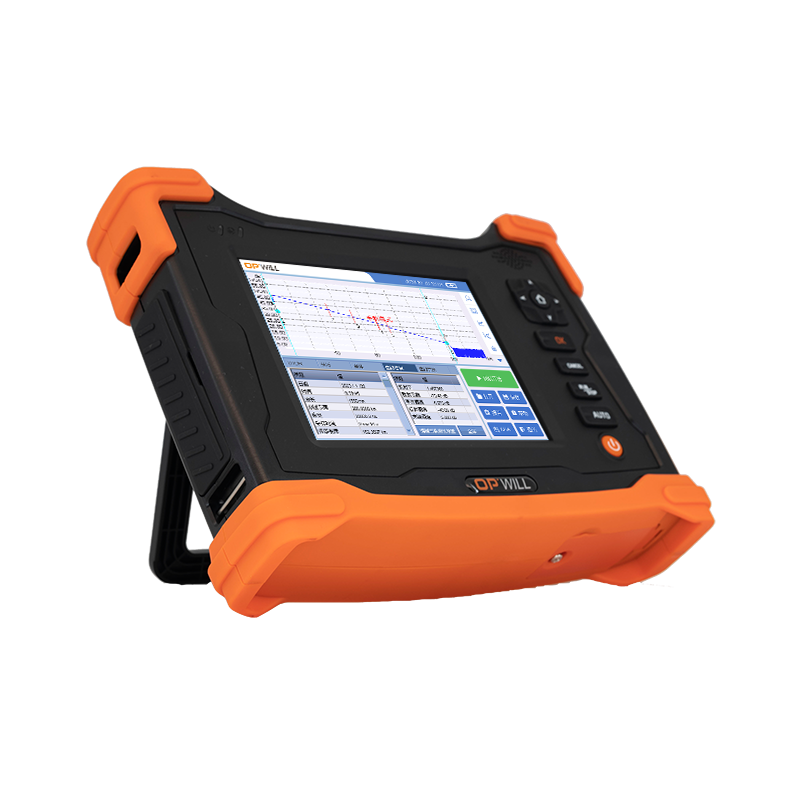
●OTDR测试功能,测量单模光纤上光连接器、光纤接头、熔接点的位置和插入损耗信息,满足整个光纤链路测试维护●支持1310,1550nm波长,动态范围支持32dB和35dB●支持SR-4731.sor标准文件格式●带有自动踪迹诊断,一键设置和事件检测的快速测试模式●双标记线功能用于距离,衰减和熔接损耗测量●支持PC离线分析软件用于数据的离线分析和打印●支持VFL红光功能
●OTC2300 OTDR模块比A5尺寸更小巧空间大小是光缆监控系统设计中需要考虑的重要因素。同时功能、性能、降低成本等各种因素都要求客户需要一个小巧的卡式OTDR模块。●具有快速而精确的操作命令OTC2300 OTDR模块兼容以太网网络控制,支持10/100M速率的RJ45以太网接口。(需要通过RS-232C接口来配置IP地址)OTC2300 OTDR模块内置一套完整的控制命令(控制命令和安立卡式OTDR相同),包含测试配置命令,测试结果的查看和测试结果的读取,以及全方位的文件格式,使其易于和光缆监控系统进行匹配。同时,OPWILL提供能够安装于PC的OTDR离线分析软件用于控制OTC2300 OTDR模块,便于光缆监控系统研发时OTDR模块的控制和调试。
同厂商产品
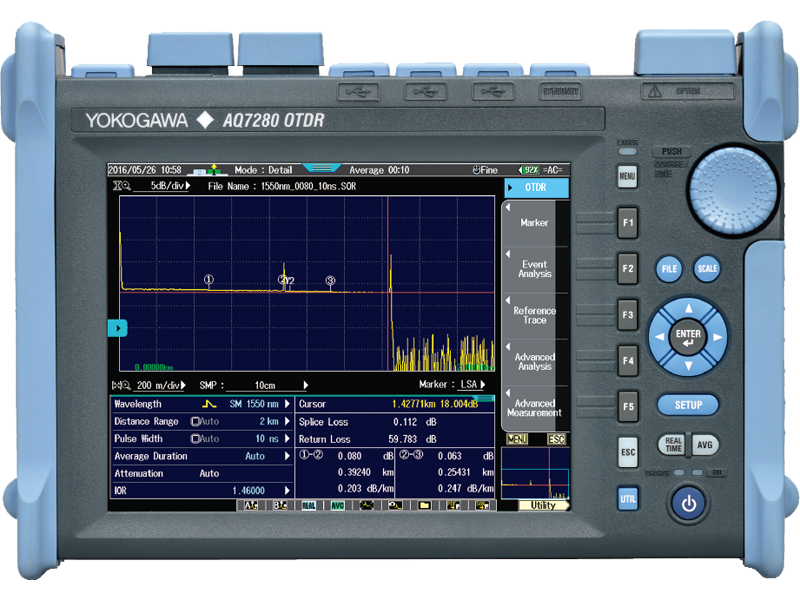
光时域反射仪 AQ7280属于光时域反射计类别。增加了 UPnP 控制命令,支持通过 UPnP,手机及平板电脑等移动设备基于网络对AQ7280进行远程控制。 / / 支持各种浏览器
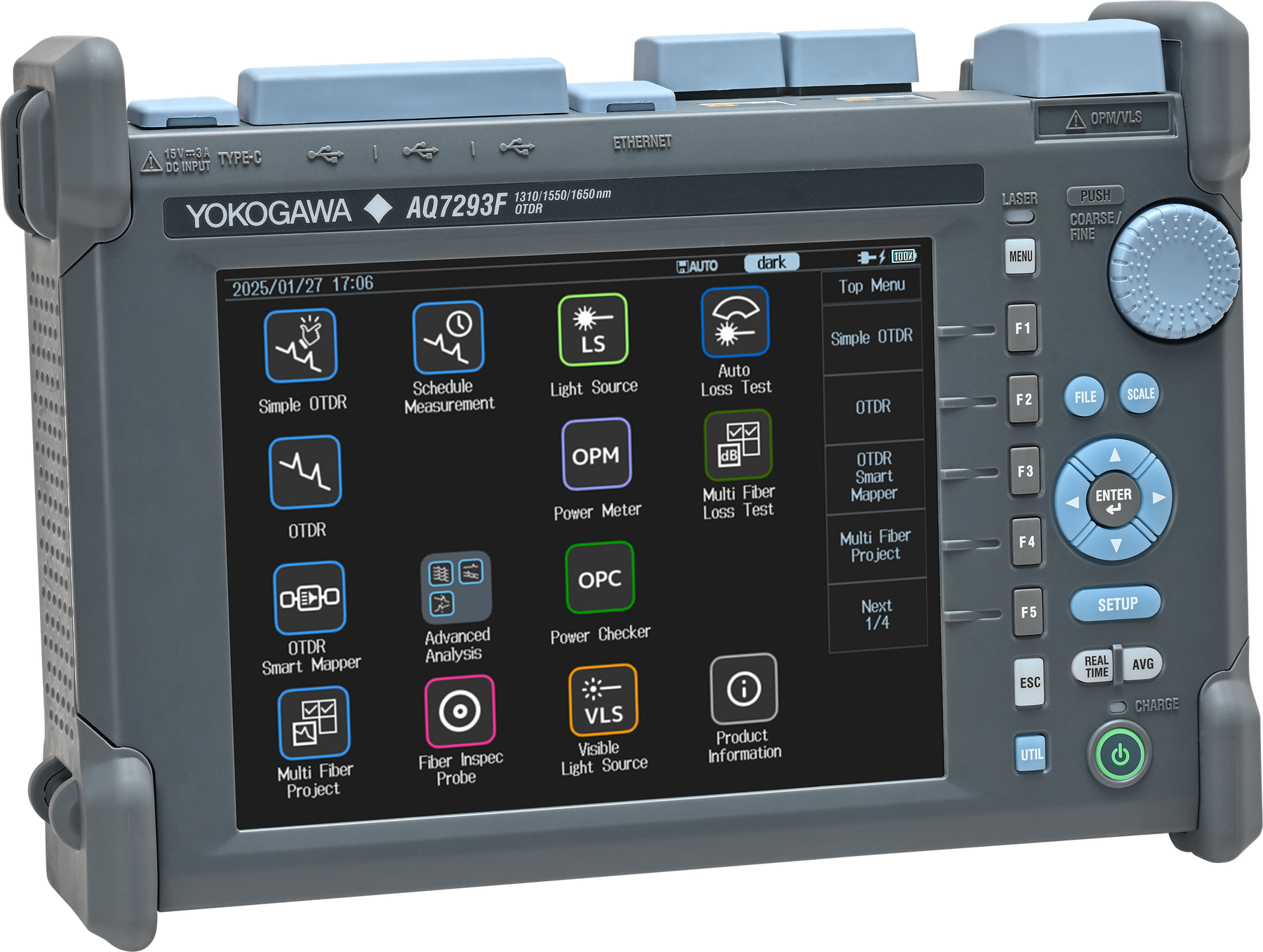
AQ7290高端光时域反射仪属于光时域反射计类别。可靠性: 坚固的结构设计确保在恶劣现场条件下稳定运行;成熟的操作系统保障系统稳定性、即时性,并提供针对软件病毒攻击的卓越防护。
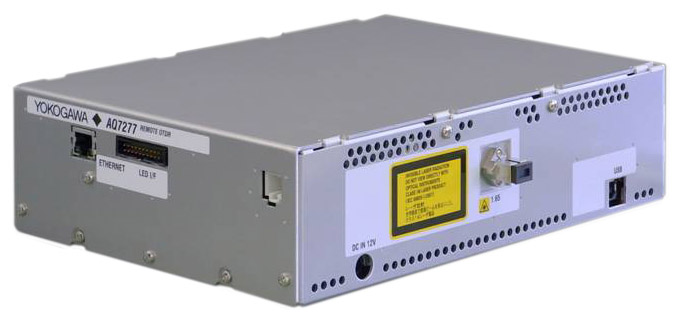
远程光时域反射仪 AQ7277属于光时域反射计类别。AQ7277是RFTS(远程光纤测试系统)的一个OTDR模块,沿用了AQ7275高性能OTDR的先进技术。
- «
- 1
- »
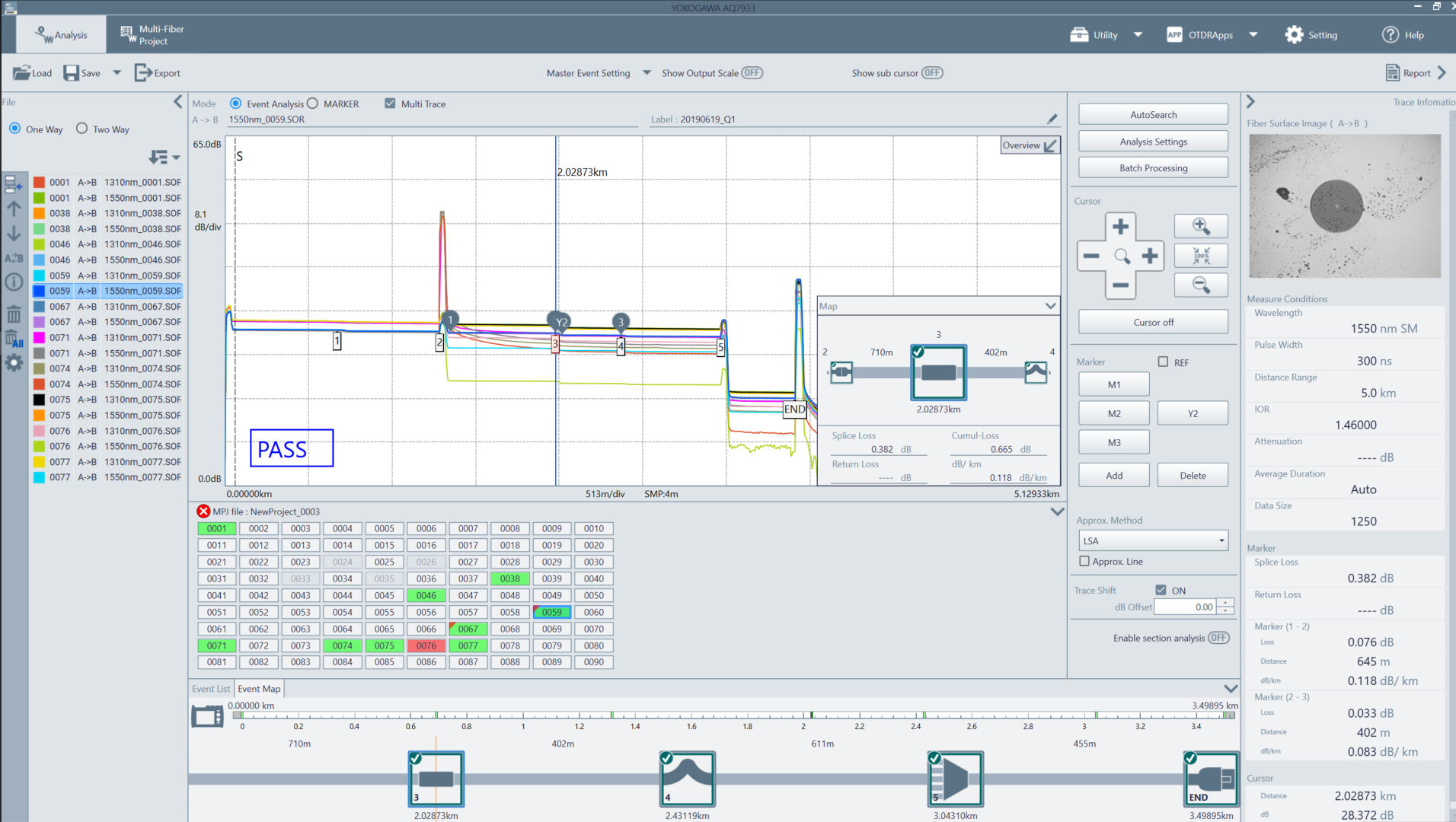
AQ7933 OTDR仿真软件|横河测试测量 (在产)
产品描述
详细指标
软件和手册|白皮书
购买渠道
选件
问大家
视频
测评
口碑
系统与解决方案
横河测试测量 YOKOGAWA
AQ7933 OTDR Emulation Software
AQ7933 is PC software for displaying, analyzing, and reportingOTDR waveform data measured by Yokogawa OTDRs. It helpsusers efficiently review large volumes of trace data, performdetailed OTDR analysis, and create professional reports frommeasurement results.
产品简介
With support for up to 1000 loaded waveforms and simultaneousdisplay of up to 24 waveforms, AQ7933 improves productivity inhigh-volume fiber testing and post-measurement analysis.Integrated applications such as the Yokogawa OTDR RemoteController and File Transfer tool also support smootherworkflows between the OTDR and PC.
We offer a trial version of the software, in which all the functions are available for 60 days.
官方定位:AQ7933 is PC software for displaying, analyzing, and reportingOTDR waveform data measured by Yokogawa OTDRs. It helpsuse…
核心参数
• File load*:File type: SOR, SOZ, MPZ, MPJ, SMP
• File save:File type: SOR, SMP
• File export:File type: CSV, TXT, BMP
• Waveform display:Up to 24 waveforms, multi-trace display
• Analysis method:One way analysis (normal analysis), two-way analysis (2way Analysis)
• Marker analysis:Loss and distance between two points, splice loss, return loss, section analysis
• Event analysis:Event editing, AutoSearch, Batch Processing, Pass Fail Judgment
• Layout selection:Seven types of templates
• Layout editing:Set and edit displayed items
• Preview window:Set and edit displayed content
产品特点
Analyze Large Volumes of OTDR Trace Data
AQ7933 helps users review and analyze large volumes of OTDR waveform data efficiently. Up to 1000 waveforms can beloaded, and up to 24 waveforms can be displayed simultaneously for easy comparison.
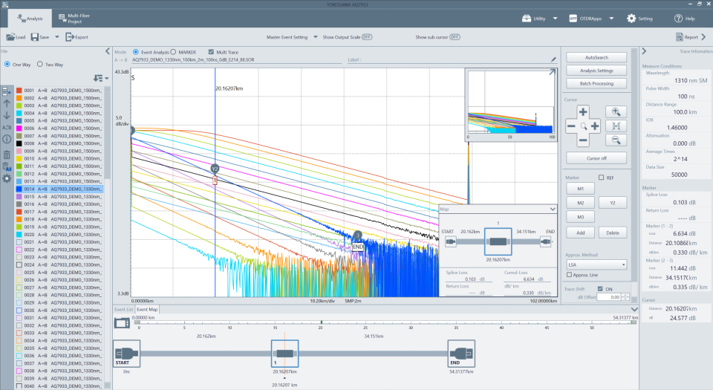
Up to 1000 waveforms can be loaded
Support Advanced OTDR Analysis
AQ7933 supports 1-way and 2-way analysis, marker analysis, event analysis, auto search, Pass/Fail judgment, and batchprocessing. These functions help improve consistency and efficiency in post-measurement analysis.
Manage Multi-Fiber and Smart Mapper Data
Multi-Fiber measurement data and Smart Mapper files can be reviewed and edited on a PC, supporting efficient analysis ofhigh-count fiber testing results.
Create Reports Efficiently
AQ7933 supports simple report creation with selectable templates and output formats such as PDF, Excel, and print.
Improve PC-Based OTDR Workflows
Integrated applications such as OTDR Remote Controller and File Transfer help streamline workflows between YokogawaOTDRs and PCs.
Up to 1000 waveforms can be loaded
You can load SOR ※1or SMP※2 files and save the results of editing events and markers to files. In the case of SOR files, up to 1000 waveforms can be loaded and up to 24 waveforms can be displayed. In the case of SMP files, up to 10 waveforms can be loaded and displayed. ※1:SOR is a file for saving waveform data (including measurement conditions) of real-time measurements and averaged measurements performed on the OTDR. ※2:SMP is a file for saving adapt waveform data (including measurement conditions) of averaged measurements performed using the OTDR Smart Mapper.
Up to 1000 waveforms can be loaded
Batch processing of analysis conditions for multiple waveforms
• Event, marker, event search conditions, event analysis conditions, pass fail conditions, print area and label
This feature assigns the following settings collectively to multiple waveforms.
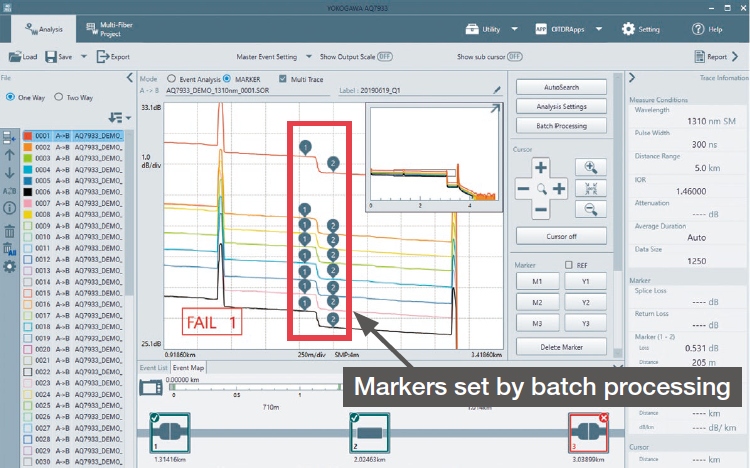
Collective event analysis
Create a work report in 3 steps
You can export the loaded waveform’s optical pulse measurement and analysis conditions, waveforms, and events as a report on a single sheet. The 3 steps to export a report are 1: load of a file, 2: display the report preview window, 3: export. It is possible to load multiple files and create multiple reports with the same layout. You can also choose which items to include in the report.
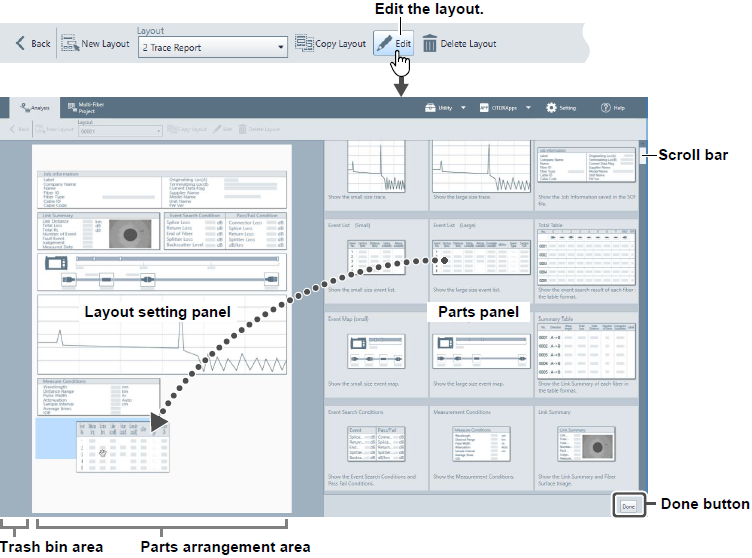
Create a work report in 3 steps
Analysis window
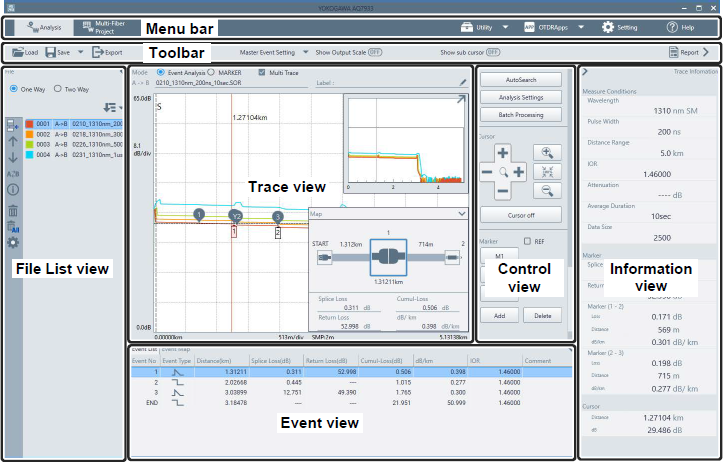
Marker analysis
One way analysis
Marker analysis
• Distance, splice loss, return loss, return loss between markers (section analysis)
You can place markers on waveforms and analyze the following measurement values.
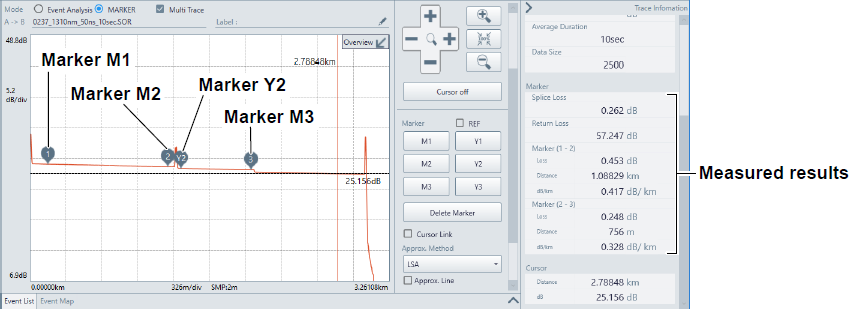
Marker analysis
Event analysis
Event analysis information (connections, splices, etc.) of loaded SOR files are displayed. The splice loss or return loss is displayed for each event. If events cannot be detected or if noise is detected as events, you can use the event edit feature to change the threshold for detecting various values to make adjustments to events.
AutoSearch
If event analysis information is not available in an SOR file measured on an OTDR, you can set analysis conditions on the software and execute an auto search.
Two-way analysis (2way analysis)
Waveform events that have been measured from optical fiber cable end A to end B and those measured from end B to end A can be combined. This combination enables displaying of events that could not otherwise be measured because of dead zones. You can save the analysis results in CSV format.
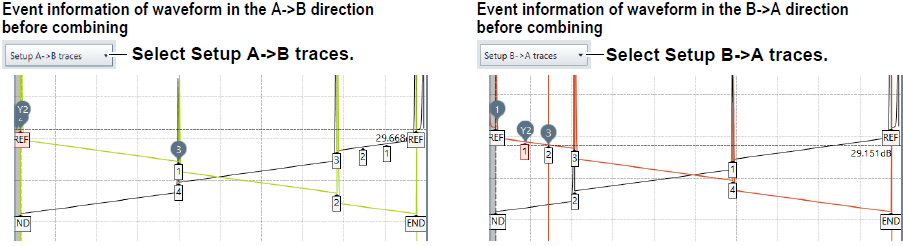
two-way analysis (2way analysis)
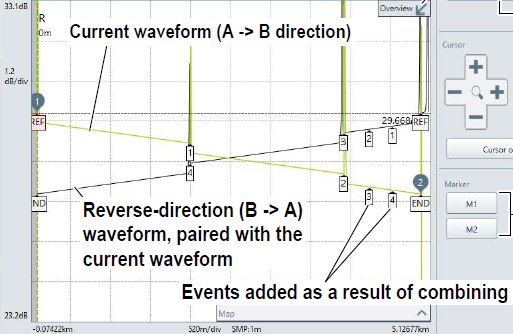
Execute 2way Analysis
SMP file analysis
When files in SMP format saved on an OTDR with the Smart Mapper feature is loaded, a composite waveform is displayed. You can edit the composite waveform by moving the line (division line) indicating the combined target waveform section of each pulse width. The smart mapper function repeats optical pulse measurements on the same wavelength using different pulse widths to combine waveforms in order to compensate for measurement accuracy degradation. * The number of measurements and pulse widths vary depending on the OTDR model and the distance range and wavelength set at the time of measurement.
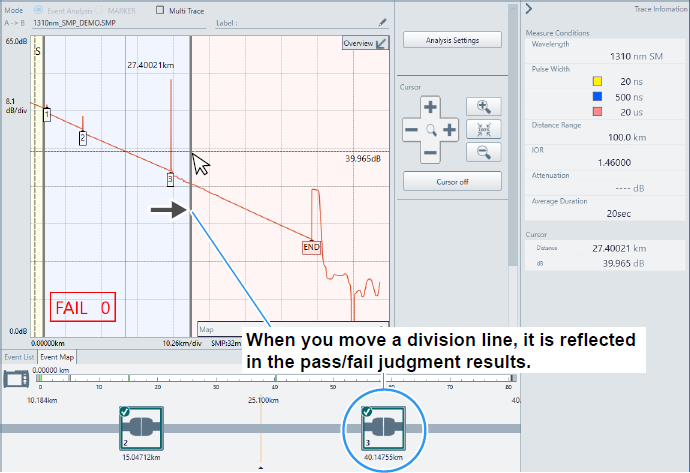
SMP file analysis
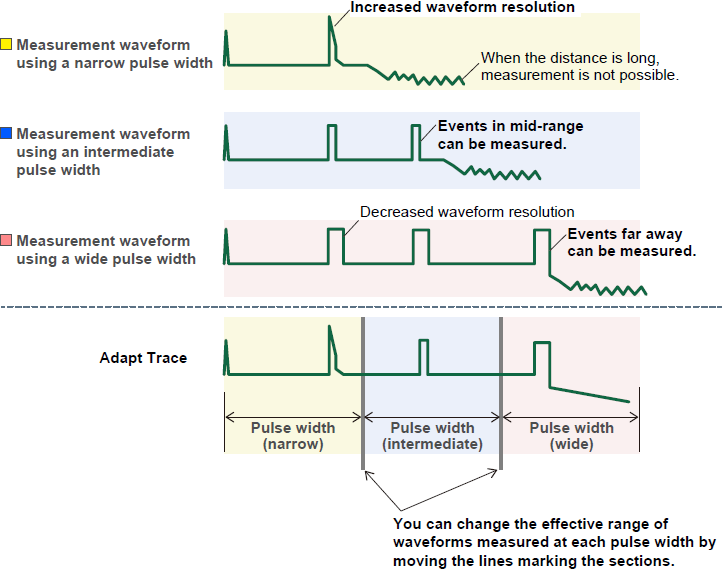
Editing Waveforms
Multi-fiber project editor
The Multi-Fiber Project Editor can create project files to be loaded and used in the multi-fiber measurement feature of the OTDR. A project file contains multi-fiber information and other measurement conditions.
View a fiber surface image
You can check the screen image data by the fiber inspection probe function of OTDR
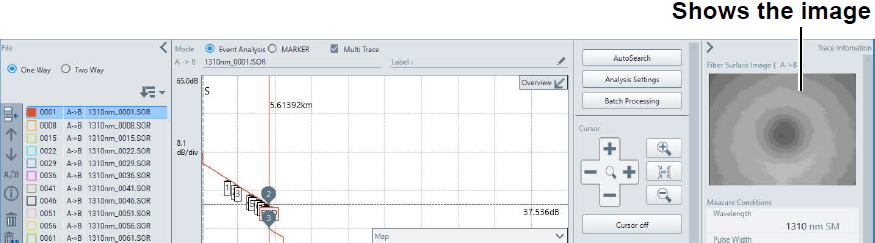
View a fiber surface image
Report Extension Tool
By loading a macro that uses Microsoft Excel VBA to the Report Extension Tool, it is possible to output a unique Excel report unique to the user.
Yokogawa OTDR remote controller
You can connect an OTDR to a PC through an Ethernet※ or Wi-Fi※ or USB interface and remotely control the OTDR from the PC. Once the Yokogawa OTDR Remote Controller OTDR is started up on your PC, the control panel is displayed on the PC so that you can remote-control the OTDR as if you do the same on the OTDR itself. ※The connection method depends on the product. Please check the introduction page of each product.
File transfer
You can connect an OTDR to a PC through an Ethernet or USB interface and exchange waveform data files.
型号与附件
Description
• The software can be used for trial without functional restrictions for 60 days. After the 60-day trial period, functional restrictions are to be applied. Please purchase a software license to lift the restrictions.
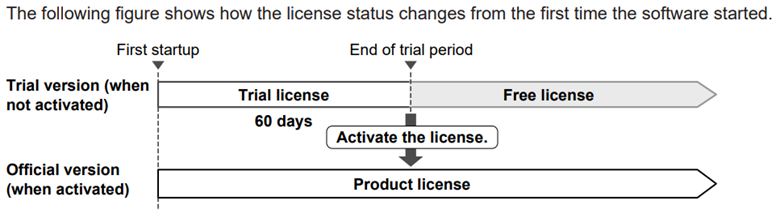
Description
License Type
• Official version:Trial version / Free version
• Analysis
• Waveform Analysis:○ / ○ / ○
• 2way Analysis:○ / ○ / ○
• Master event setting:○ / ○
• Batch processing:○ / ○
• Trace table view:○ / ○
• Report generation
• 1 Trace Report:○ / ○ / ○
• 2 Traces Report:○ / ○ / ○
• 4 Traces Report:○ / ○
• 6 Traces Report:○ / ○
• 8 Traces Report:○ / ○
• Total table:○ / ○
• Summary table:○ / ○
• Report layout edit:○ / ○
• Other Applications
• Multi-Fiber Project Editor / ○ / ○
• Remote Controller:○ / ○ / ○
资源下载
详细指标请见 AQ7933 OTDR Emulation Software 详细指标页。
横河测试测量 · onetest 仪器资源库
横河测试测量 YOKOGAWA
AQ7933 OTDR Emulation Software 详细指标
AQ7933 OTDR Emulation Software(光时域反射计)关键指标汇总。数据整理自厂商官方产品页与手册资料。
产品简介
With support for up to 1000 loaded waveforms and simultaneousdisplay of up to 24 waveforms, AQ7933 improves productivity inhigh-volume fiber testing and post-measurement analysis.Integrated applications such as the Yokogawa OTDR RemoteController and File Transfer tool also support smootherworkflows between the OTDR and PC.
We offer a trial version of the software, in which all the functions are available for 60 days.
详细指标
Main Features
• * When an SOZ or MPZ file is loaded, the SOR files contained within are loaded. When an MPJ file is loaded, the associated SOR files are loaded.
• Analysis
• File load*:File type: SOR, SOZ, MPZ, MPJ, SMP
• File save:File type: SOR, SMP
• File export:File type: CSV, TXT, BMP
• SOR file analysis:Waveform load / Up to 1000 waveforms
• Waveform display:Up to 24 waveforms, multi-trace display
• Analysis method:One way analysis (normal analysis), two-way analysis (2way Analysis)
• Marker analysis:Loss and distance between two points, splice loss, return loss, section analysis
• Event analysis:Event editing, AutoSearch, Batch Processing, Pass Fail Judgment
• Master event setting:Set events collectively on multiple waveforms
• SMP file analysis:Waveform load / Up to 10 waveforms
• Waveform display:Up to 10 waveforms, multi-trace display
• Composite waveform editing / Pass Fail judgment
• Report creation
• Layout selection:Seven types of templates
• Layout editing:Set and edit displayed items
• Preview window:Set and edit displayed content
• Report output:Printing, PDF file, Excel file
• Multi-Fiber Project Editor
• File load:File type: MPJ, MPZ
• File create, save:File type: MPJ
• Set/edit:Analysis Setup, Other Setup, Group Settings
• Others
• Utility:MPZ Converter, Trace Table
• OTDR Apps:Yokogawa OTDR Remote Controller, File Transfer
• Support tool:AQ7933 Report Extension Tool
System Requirement
• PC:Clock speed / Speed at which the operating system can run smoothly
• Storage:Free space of at least 10 GB
• Memory size:At least 4 GB (at least 8 GB recommended) / * Continuous output and continuous printing of reports may require large amounts of / memory. If there is not enough memory, the software may not run properly.
• Display:Resolution: 1600×900 or higher
• Disk drive:CD-ROM drive (if you purchased the standard version with CD)
• OS:Windows 7 (Service Pack1 or later)
• Windows 8/8.1
• Windows 10
• Windows 11
Supported models
• Series name:Model name / firmware / version
• AQ7270 series:735020, 735021, 735022, 735023, 735024, 735025, 735026, 735027, 735028, 735029, 735030 / 2.03 and later
• AQ7275 series:735031, 735032, 735033, 735034, 735035, 735036, 735037, 735038, 735040, 735041 / 3.08 and later
• AQ1200 series:AQ1200A, AQ1200B, AQ1200C, AQ1200E, AQ1205A, AQ1205E, AQ1205F / 3.03 and later
• AQ7280 series:AQ7282A, AQ7283A, AQ7284A, AQ7285A, AQ7283E, AQ7283F, AQ7282G, AQ7283H, AQ7284H, AQ7283J, AQ7283K, AQ7282M, AQ7286A, AQ7286H, AQ7286J / 2.05 and later
• AQ7277 series:AQ7277, AQ7277B / 1.01 and later
• AQ1000 series:AQ1000 / 1.03 and later
• AQ1210 series:AQ1210A, AQ1215A, AQ1210D, AQ1210E, AQ1215E, AQ1215F, AQ1216F / 1.03 and later
• AQ7290 series:AQ7292A, AQ7293A, AQ7294A, AQ7293F. AQ7293H. AQ7294H / 1.01 and later
Available Languages
• English, Japanese, Chinese, Korean, German, French, Polish, Russian, Indonesian
手册与资料
说明
以上指标摘自厂商官方产品页与公开手册,若与随机文件不一致,以随箱文件为准。
横河测试测量 · onetest 仪器资源库
全部
横河测试测量官方渠道
厂家联系方式
技术与服务热线:400 820 0372
横河测量技术(上海)有限公司总部及上海分公司
地址:上海市长宁区天山西路799号603室
邮编:200335
电话:(86)-21-6239 6363
华东、华中、西南地区
苏州办事处
地址:苏州工业园区苏华路8号中银惠龙大厦1608室
邮编:215021
电话:(86)-512-6762 5501
杭州办事处
地址:杭州市西湖区古墩路387号绿城金桂大厦908室
邮编:310012
电话:(86)-571-8779 9106
南京办事处
地址:南京市鼓楼区云南北路49号天星翠琅大厦12楼J座
邮编:210009
电话:(86)-25-8315 3019
无锡办事处
地址:无锡市惠山区探索路6号宇野科技大厦B栋1807室
邮编:214000
电话:(86)-510-8359 0699
武汉办事处(通用测试)
地址:武汉市东湖新技术开发区光谷大道中国光谷云计算海外高新企业孵化中心1号楼2707室
邮编:430073
电话:(86)-27-6552 7728/7729
成都办事处
地址:成都市高新区吉泰五路88号香年广场3栋906号房
邮编:610095
电话:(86)-28-8620 2660/2680
北京分公司
地址:北京市东城区崇文门外大街8号院1号楼12层西塔1204-5,1204-6号
邮编:100062
电话:(86)-10-8522 1699
东北、华北、中原、西北地区
长春办事处
地址:长春市南关区亚泰大街6789号万晟商务花园2号楼1203室
邮编:130022
电话:(86)-431-8860 6412
沈阳办事处
地址:沈阳市沈河区青年大街169号盛华公馆A座813
邮编:110004
电话:(86)-24-3165 7770
天津办事处
地址:天津市南开区宾水西道时代奥城酒店式公寓19号楼1215房间
邮编:300381
电话:(86)-22-8378 8675
青岛办事处
地址:山东省青岛市市北区连云港路33号万达商务楼B座3018室
邮编:266034
电话:(86)-532-5568 5892
西安办事处
地址:西安市西咸新区沣东南路1000号环普西安沣东科创园A1栋3层301-2单元
邮编:710086
电话:暂无
武汉办事处(光通信测试)
地址:武汉市东湖新技术开发区光谷大道中国光谷云计算海外高新企业孵化中心1号楼2707室
邮编:430073
电话:(86)-27-6552 7728/7729
深圳分公司
地址:深圳市福田区益田路6009号新世界商务中心1405室
邮编:518026
电话:(86)-755-8373 4453/4456/4458/4459
华南地区
广州分公司
地址:广州市越秀区环市东路362-366号好世界广场2707
邮编:510060
电话:(86)-20-8371 7571/8365 8409
东莞办事处
地址:东莞市南城区宏北路18号碧桂园商务中心1522室
邮编:523000
电话:(86) -769-2288 8391
授权代理商
北京诺约科技有限公司 办公地址:北京市朝阳区大屯路222号院2号楼10层1009 联系电话:010-68944158 电子邮箱:market@promise-auto.com
WT300/GP/GM系列产品代理商
深圳市科瑞杰科技有限公司 代理区域:深圳市、惠州市、东莞市 办公地址:广东省深圳市龙华新区东环一路与建设路口恒和国际大厦1204 联系电话:0755-29812627/13823584162 电子邮箱:sales@keruijie.com.cn
北京凡实测控技术有限公司 代理区域:北京 办公地址:北京市丰台区玉泉营桥111文化产业园中科万邦大厦A501 联系电话:010-68456100/18518917293 电子邮箱:18518917293@163.com
大连通测仪器有限公司 代理区域:辽宁省 办公地址:辽宁省大连市沙河口区联兴巷18号22-5 联系电话:0411-88855568 电子邮箱:dltcyq@163.com
杭州鼎伟电子有限公司 代理区域:浙江省 办公地址:浙江省杭州市钱塘区下沙街道望钱塘印中心4幢505,506室 联系电话:0571-86705627/13656818305 电子邮箱:hanxiaojian@hzdwdz.com
西安益泰金泓电子科技有限公司 代理区域:陕西省、甘肃省 办公地址:陕西省西安市高新区锦业一路研祥城市广场B座3029室 联系电话:029-81100955/15319801817 电子邮箱:caihongdeweixiao@yitaijinhong.com
曲尺技术(武汉)有限公司 代理区域:湖南省、湖北省、江西省 办公地址:湖北省武汉市东湖高新技术开发区高新六路99号南山光谷自贸港A栋705# 联系电话:027-87771662/15377622261 电子邮箱:sales@eanalyzer.com.cn
成都曲尺科技有限公司 代理区域:四川省、云南省、贵州省、西藏自治区、重庆市 办公地址:四川省成都市金牛区兴科中路3号2栋2单元1层1号309室 联系电话:18927491671 电子邮箱:libiao@eanalyzer.com.cn
纬斯康(青岛)科技有限公司 代理区域:山东省 办公地址:山东省青岛市市北区黑龙江南路2号丙万科中心C栋1622室 联系电话:0532-85611860 / 18562590015 电子邮箱:wsk@wisecom-tech.com
郑州晶测科技有限公司 代理区域:河南省 办公地址:河南省郑州市管城区商城东路9号院8号楼1单元8层29号 联系电话:0371-86163367 / 13663005190 电子邮箱:jingcekeji@163.com
上海顺测电子有限公司 代理区域:上海市 办公地址:上海市松江区九新公路1005号4号楼102单元 联系电话:021-53087663 / 18616664242 电子邮箱:tony@shunce.net
DLM3000系列产品代理商
Electronic Scientific Engineering Ltd. 科电工程有限公司 代理区域:香港、澳门 办公地址:25/F Chinachem Exchange Square, 1 Hoi Wan Street, Quarry Bay, Hong Kong
香港鰂鱼涌海湾街1号华懋交易广场25楼 联系电话:Office 852- 2589 0864/ Mobile 852- 5109 7238 电子邮箱:alexleung@ese.com.hk
便携式产品(PTI)、MT/MC压力测量仪 代理商
上海横久电子科技有限公司 代理区域:上海市、江苏省、浙江省、安徽省、江西省、湖北省、湖南省、福建省 办公地址:上海市共和新路3699号共和国际商务广场A栋519室 联系电话:021-61810102 电子邮箱:yokoever@yokoever.com
广州技创电子设备有限公司 代理区域:广东省、广西省、海南省 办公地址:广州市黄埔区开创大道2395号至泰广场A2栋1104室 联系电话:13711672610 电子邮箱:daqi.li@jichuang-china.com
OTDR系列产品代理商
北京益安佳光电科技发展有限责任公司 代理区域:全国 办公地址:北京市海淀区巴沟南路35号京江阳光写字楼C座201-209室 联系电话:010-82562516 电子邮箱:daihongling@bj-everbetter.com.cn
北京路和兴信息技术有限公司 代理区域:全国 办公地址:北京市朝阳区八里庄西里99号住邦2000商务中心2号楼1701室 联系电话:010-85869430 电子邮箱:my117@lookworld.com.cn
成都雄博科技发展有限公司 代理区域:全国,以西南为主 办公地址:四川省成都市高新区环球中心西区(W5)7幢11楼1106号 联系电话:028-85140748 电子邮箱:18981784997@163.com
福州福光电子有限公司 代理区域:全国 办公地址:福建省福州市台江区广达路68号金源大广场东区24层 联系电话:0591-83305858 电子邮箱:hongji@fuguang.com
深圳维博信通科技有限公司 代理区域:全国 办公地址:广东省深圳市福田区新洲九街嘉葆润金座A座1713-1714室 联系电话:0755-25310527 电子邮箱:ford@ever-sun.com.cn
0条提问
X
提问
X
回答
暂无视频
0条口碑
X
发表口碑




 粤公网安备44030902003758